

Back in January I wrote about "John," who was having trouble with past tense verbs, and "Julia," who couldn't quite get future tense down. They both scored around 70%, so on paper they looked about the same, even though they needed completely different things from their teacher. I want to continue speaking about this idea because it's a real problem Investant solves.
So in this post I want to walk through the analytics update we just shipped, which is our biggest step yet toward solving that problem. After that, I'll get into what's coming next with AI, including exactly how we plan to use it.
What We Built
We rebuilt the analytics in Investant Academy from the ground up, with one goal in mind: every screen should answer the question a teacher actually came there with, before it shows you a bunch of charts.
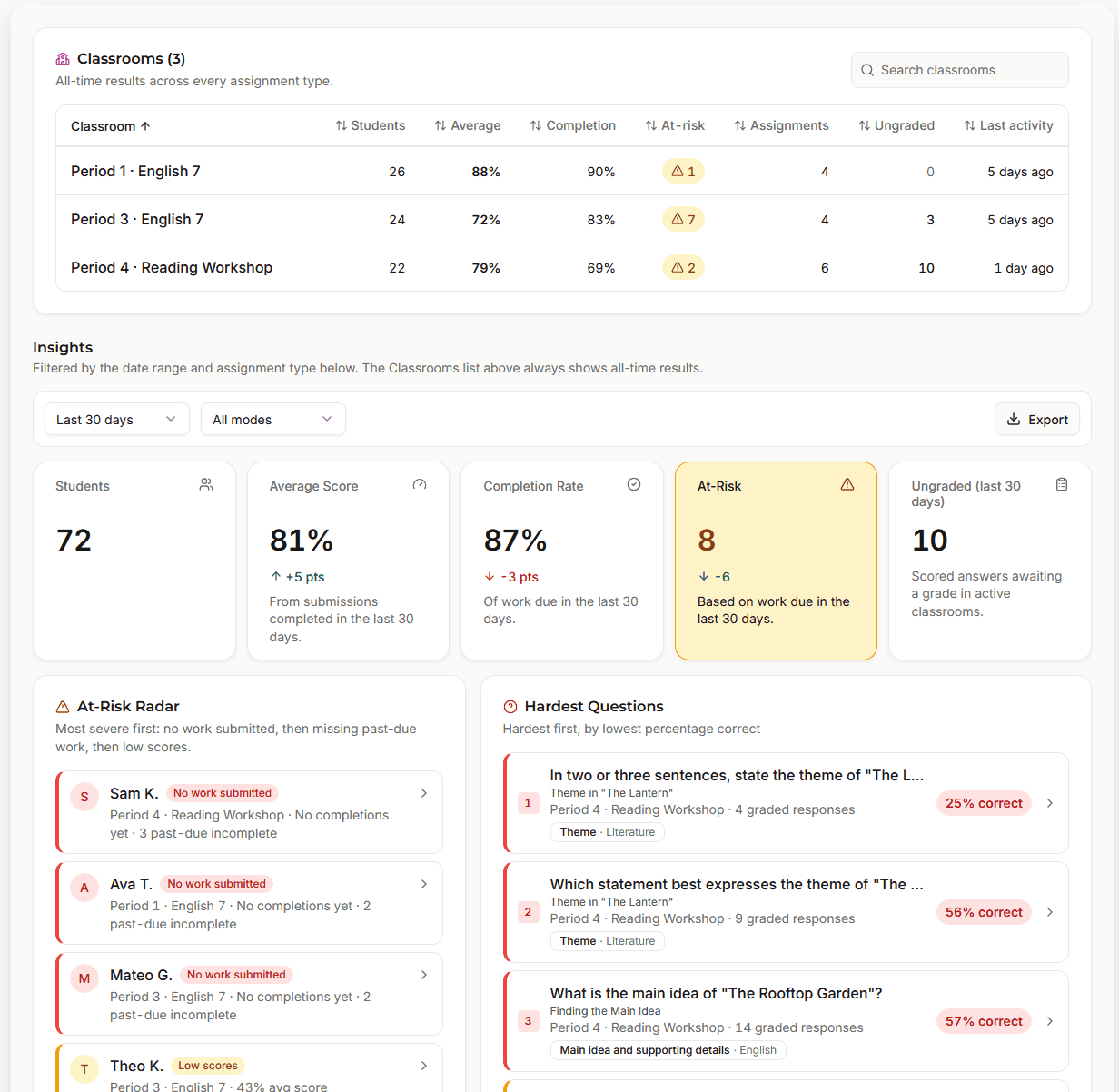
When you open Analytics now, you start with your classrooms and whatever stands out across them, like which students need attention (and the reason why, such as low completion or a low score), and which questions gave your classes the most trouble. From there you can click into any classroom, then any assignment, then any single question, and each of those screens has its own link, so you can bookmark come back to it later if needed.
Seeing the Wrong Answer, Not Just the Score
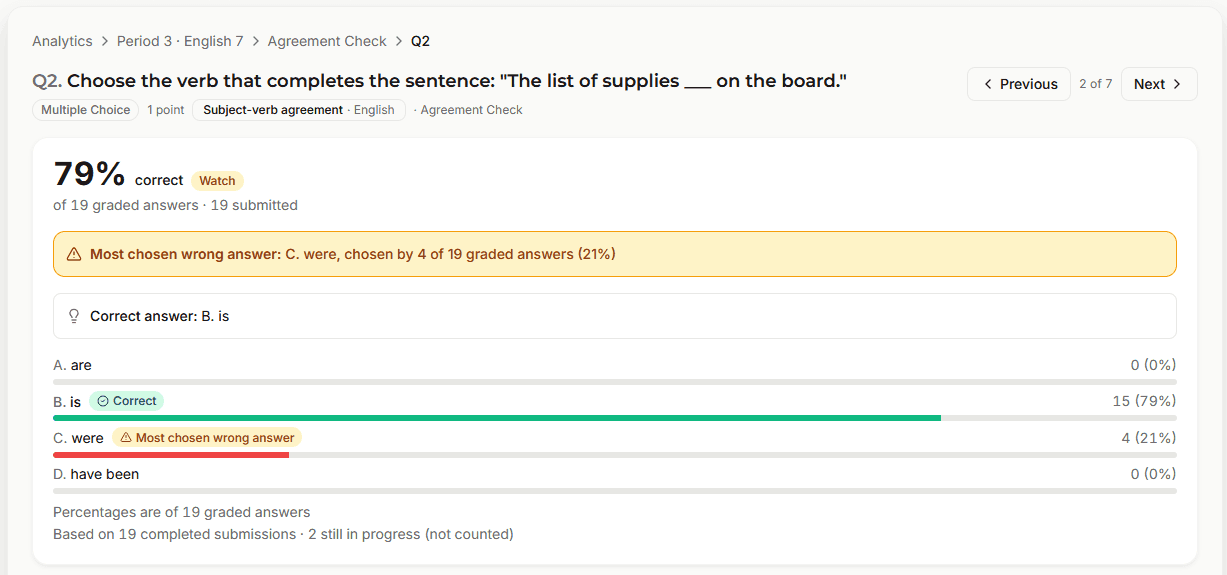
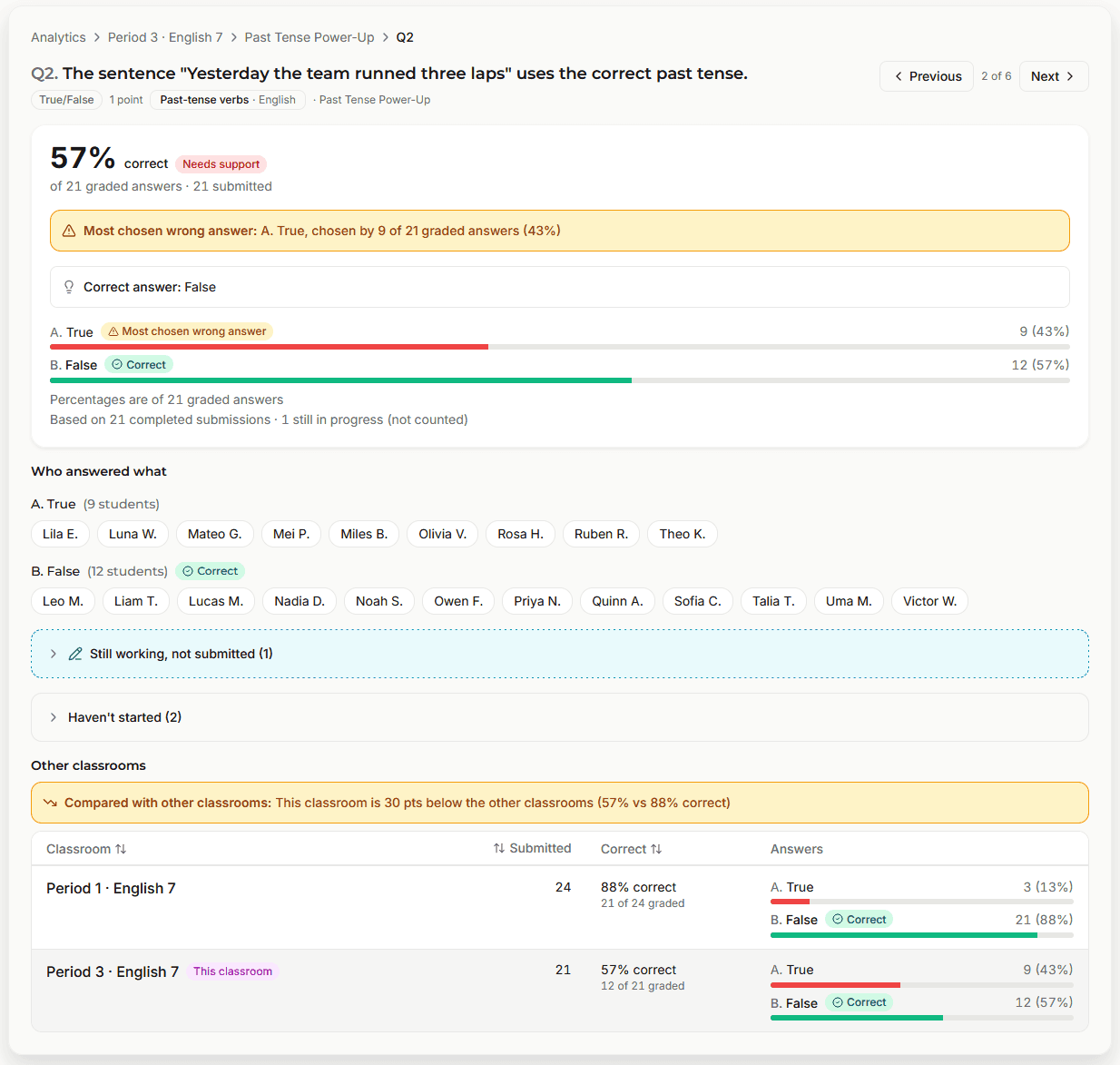
Knowing that only 38% of the class got a question right tells you something went wrong, but it doesn't tell you what. So every question now shows which answers your students picked and who picked each one, and when a good chunk of the class lands on the same wrong answer, Investant Academy points it out for you.
Say you asked for the past tense of "bring," and most of Period 3 chose "She brang." Investant will signal to you the misconception the whole room shares, and now you know exactly what it is. You can see which students chose it and how your other classes did on the same question, which makes it a lot easier to decide where to spend your time.
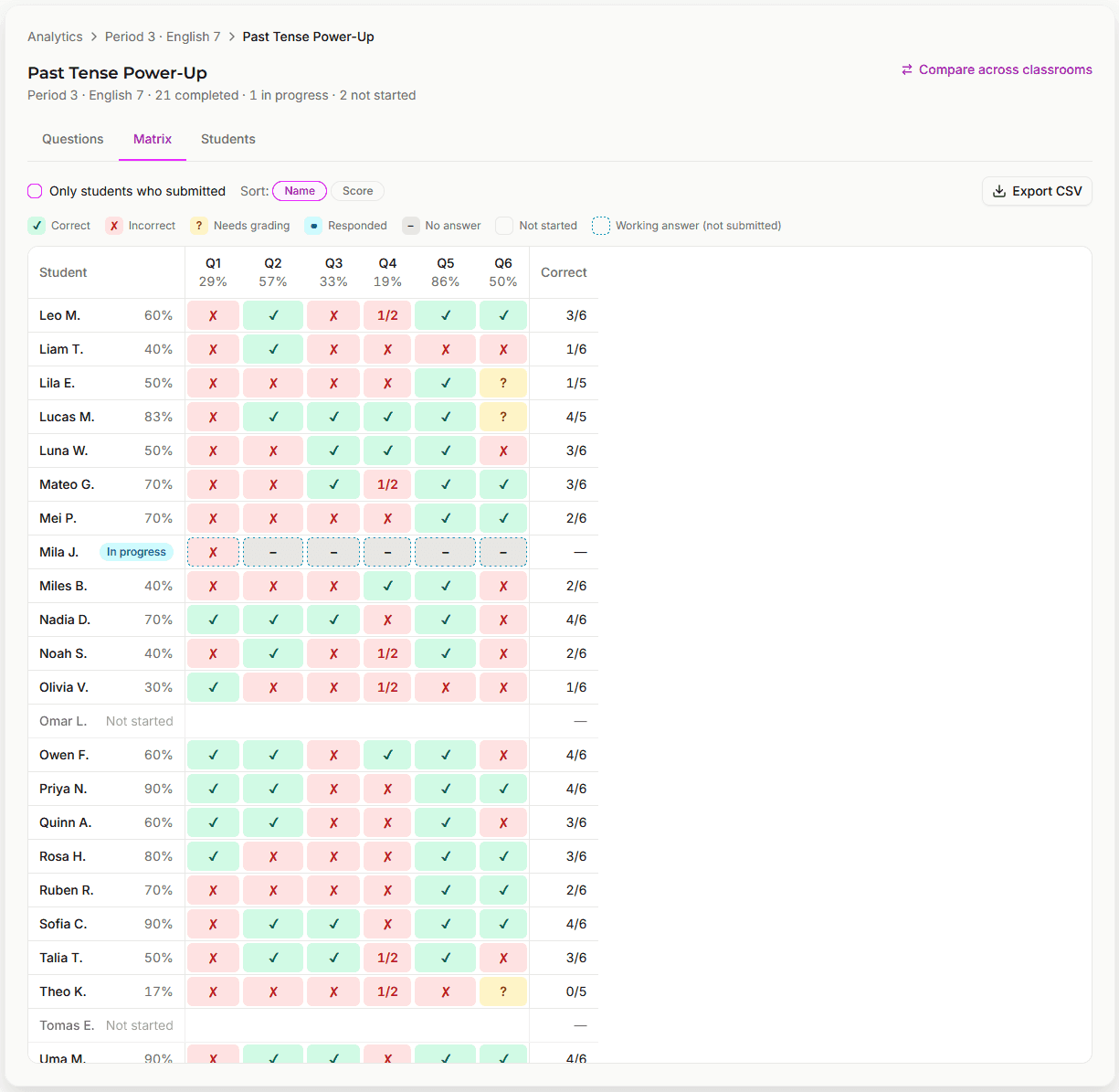
There's also a grid of every student against every question, so you can take in a whole assignment at a glance. If a column is full of misses, the question (or the material behind it) probably needs another look, and if a row is full of misses, that's a student who could use some extra help.
Spotting Patterns Across Assignments
One wrong answer on its own doesn't tell you much, but the same mistake showing up across three assignments usually does. That's the part I really wanted teachers to be able to see.
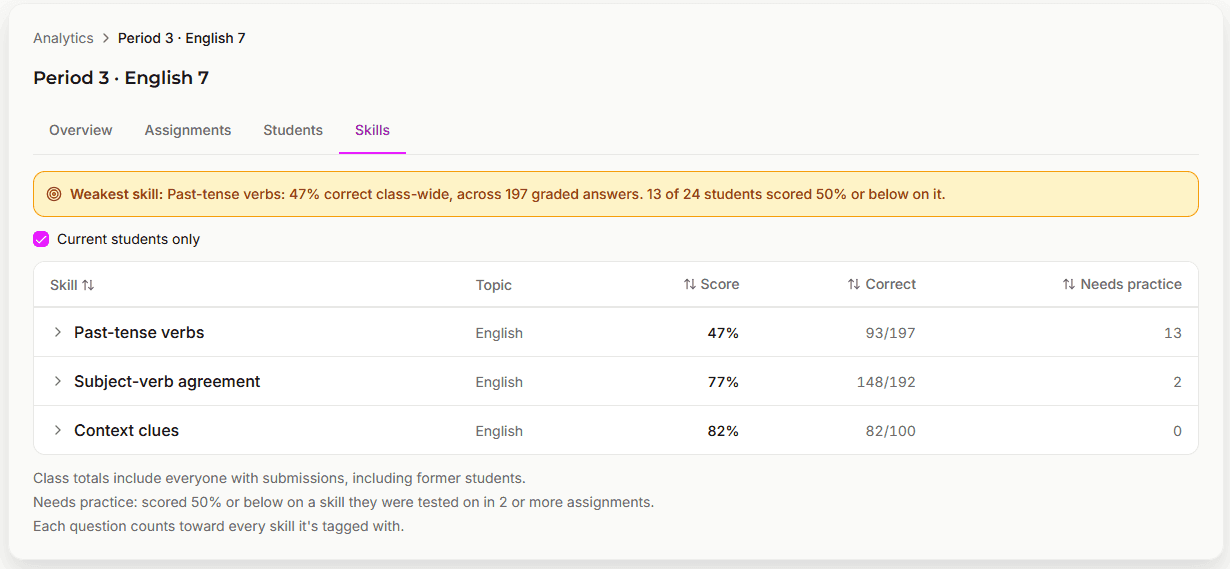
You can now tag each question with up to three skills, either from our standard list or ones you create yourself. Every answer then counts toward those skills across all of the assignments and live quizzes in a classroom. If a student scores 50% or below on a skill across two or more assignments, they're marked as "Needs practice," and if the whole class is struggling with a skill, it shows up as that classroom's weakest skill.
Here's an example from our demo classrooms. Maya is averaging over 85% and is on track overall, so by most measures she's doing great. But she's also missed past tense verbs on three separate assignments, and that's something a regular gradebook would never show you.
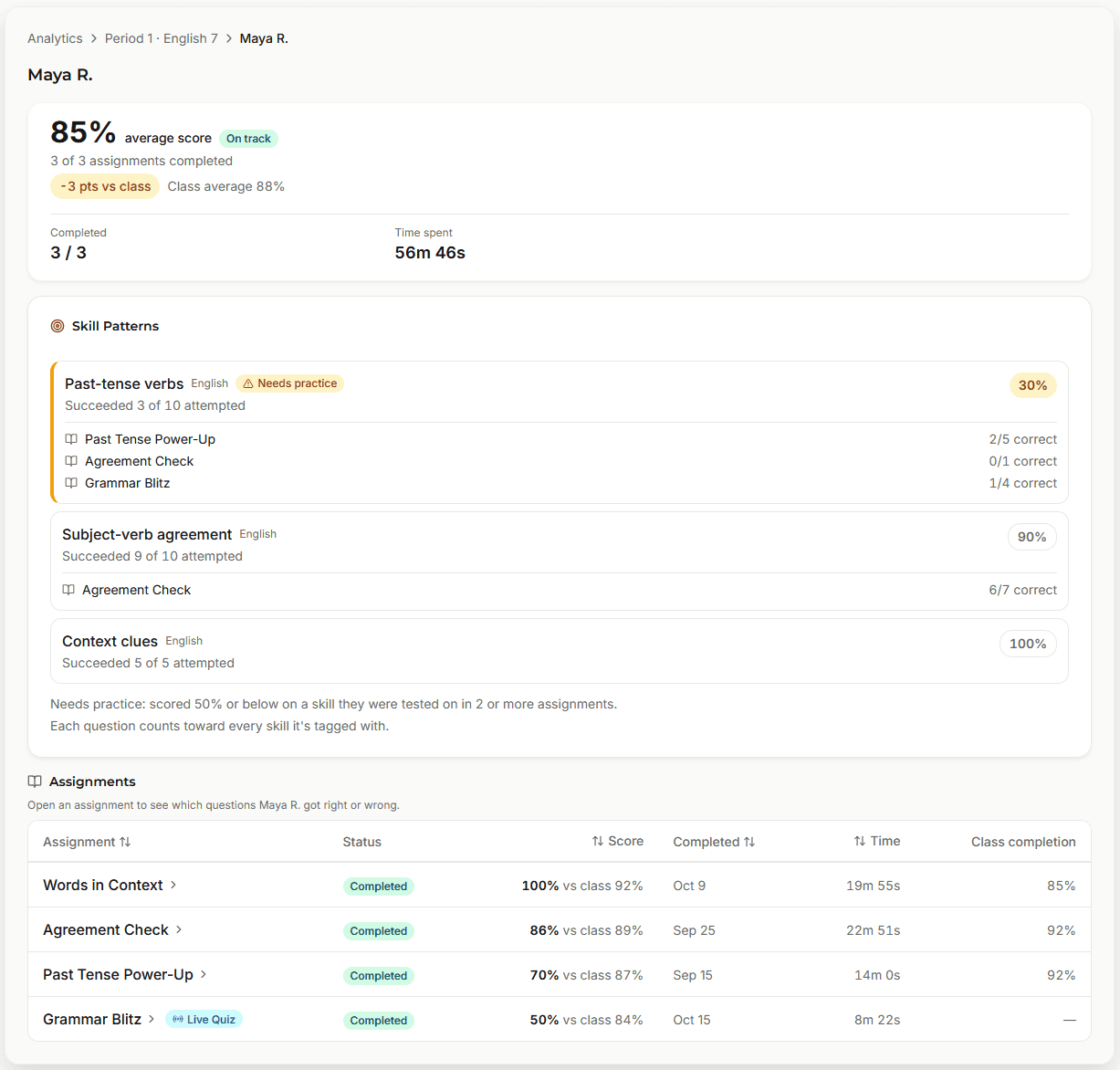
This is the John and Julia problem, solved for every student in every class, without anyone digging through a stack of papers to find it.
Since teachers act on these numbers in front of their students, we've also held ourselves to a few rules:
- Every percentage tells you what it's out of, so you'll see "72% of 18 graded answers" rather than just "72%"
- A student with nothing graded yet shows "no data yet," not zero
- An answer that hasn't been graded is never counted as wrong
What's Live Right Now
- An overview of every classroom, with the students who need attention and the reason why
- Classroom, assignment, question and student screens, each with its own link
- Every answer choice on every question, with who chose it and the most common wrong answer
- A student-by-question grid for every assignment
- The same assignment or question compared across your classrooms
- A skill library, with up to three skills per question
- "Needs practice" flags for students who keep missing the same skill, plus each classroom's weakest skill
- Live Quiz results included in all of it
If you'd like to try it yourself, our Academy Demo now runs the exact same analytics as the real product, using three sample English and Reading classes. Feel free to click around and see if you can find Maya.
What's Next: How We'll Use AI
I've mentioned AI in a few past posts, and before any of it ships I want to be specific about what it'll actually do. A lot of companies use "AI" to mean almost anything these days, so here's what it will mean in Investant Academy.
Everything follows one rule: AI suggests, and teachers decide. AI will never put a final grade on a student's work, and nothing it creates will reach a student unless a teacher approves it, either directly or by turning on auto-assign for their classroom.
With that in mind, here's what we're building.
Review lessons for missed skills. When analytics finds students who need practice on a skill, AI can draft a short review just for those students. You look it over and decide whether to assign it, and afterwards analytics shows you whether that skill actually improved.
Drafting lessons and quizzes. You'll be able to describe what you want, or paste in a reading, and AI will draft the slides and questions for you. The draft opens in the editor without being saved, so you can read through it, change whatever you like, and save it when you're happy with it. It's never published or assigned on its own.
Grading suggestions for written answers. For free-response questions, AI will suggest a score, explain its reasoning to you, and draft some feedback for the student. Each suggestion comes with a label showing how certain the AI is, and you can accept it, change it or ignore it entirely. Until you accept a suggestion, that answer still counts as ungraded.
Auto-assign, if you want it. Both your organization's admin and the classroom's teacher have to turn this on before it does anything. Once it's on, short reviews go out once a week to the students who need practice. These reviews don't count toward completion rates or averages, there's a weekly limit per classroom, and you'll get an email each week showing what went out, who it went to, and how those students did. You can turn it off at any time.
A help assistant for teachers. You'll be able to ask "how do I..." questions and get an answer with a link to the right screen. If you need more help, it can open a support ticket for you, but only once you confirm.
Keeping Students Safe
This part matters more to me than any of the features above, so I want to be clear about it.
Student usernames are replaced with placeholders like "Student 1" before anything is sent to the AI provider, then put back before you see the result. We use Anthropic's Claude through their commercial API, which doesn't train on customer data. We also keep as little as we can: assistant conversations aren't stored on our servers, and AI drafts are deleted 7 days after they're made unless you save them.
AI features will be included with the Pro and Pro Plus plans, and you'll always see what an action costs before you use it.
Before any of this turns on, we'll update our Terms of Service and Privacy Policy to cover AI. The next time you sign in after that, you'll be asked to review and accept the new versions, and you'll always be able to read exactly what changed.
See It in Action
Investant Academy is in early access, and we're building all of this alongside feedback from real classrooms. The AI features will roll out over the next few months, starting with lesson drafts.
If you want to see analytics that show you why students are getting things wrong, check out the Academy Demo or start a free trial. And if you have thoughts on how AI should or shouldn't work in your classroom, I'd love to hear them. You can reach me directly at ryan@investant.net, and I read every email.
Ryan White is the founder of Investant, an all-in-one classroom management platform that helps teachers create interactive lessons, automate grading, and understand student performance at scale.